

How to Find the Trading Best App for Fast Order Execution. 5 Speed Checks


Finding the trading best app for fast order execution requires more than comparing the speed claims advertised by different brokers. An app may claim to process orders in a few milliseconds, but that figure may cover only the broker's internal system rather than the complete journey from your device to the stock exchange.
For active traders, even small execution delays can affect entry prices, exit prices, and trading outcomes. This makes it important to evaluate actual execution performance instead of relying only on marketing claims. Here are five practical speed checks you should perform before choosing a trading app for fast order execution.


1. Check What Order Execution Speed Actually Measures
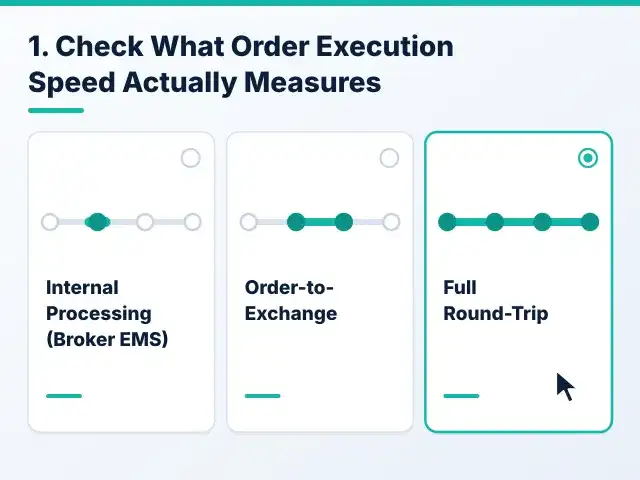
Before comparing trading apps, understand what the broker means by execution speed. Different brokers measure latency differently, which can make their advertised numbers difficult to compare. There are three important latency measurements to understand.
Internal Processing (Broker EMS)
This measures the time taken by the broker's internal order processing engine. For example, a broker may report internal processing speeds of 4–7 ms. However, this does not include the time required to send an order from your device to the broker's system.
Order-to-Exchange
This measures the time taken from when an order reaches the broker's system until it reaches the exchange gateway.
Full Round-Trip
This measures the complete journey from the moment you tap the buy or sell button on your device until the execution confirmation appears on your screen. The difference between these measurements matters because internal processing speed does not represent the complete order execution experience.
Practical takeaway: Always check the starting and ending points of the advertised latency figure. Compare similar measurements rather than assuming that every broker calculates execution speed in the same way.
2. Look for P95 and P99 Execution Speed Instead of Average Speed
Average execution speed does not always show how consistently a trading app performs. An app may have an impressive average latency but still experience significant delays during certain orders. This is where P95 and P99 measurements become useful. These percentiles show how an app performs across a larger number of orders.
- P95: Represents the execution speed at or below which 95% of orders are completed.
- P99: Represents the execution speed at or below which 99% of orders are completed.
For example, a P95 execution time of 6.61 ms means that 95 out of every 100 orders are executed within 6.61 ms.
Why does this matter?
An app with a low average execution time may still experience occasional latency spikes. These delays can become important when markets move quickly and traders need to execute orders at specific prices. P95 and P99 measurements help you understand these slower execution periods instead of looking only at the average.
Practical takeaway: Ask brokers whether they publish P95 or P99 execution statistics. These figures can provide a better understanding of execution consistency than average speed alone.
3. Test Performance During Peak Volatility and Expiry Sessions
A trading app may perform smoothly when market activity is low. However, its performance during high-volume trading sessions provides a better indication of its execution capabilities. The final 90 minutes of high-volume expiry sessions and periods of major market news can create significant increases in trading activity.
During these periods, traders may place multiple orders within a short time. A platform that performs well under normal conditions may experience delays when order volumes increase. You should therefore evaluate a broker's operational history during busy market sessions.
Pay attention to three important factors.
- Technical halts: Check whether the platform has experienced interruptions during important trading sessions.
- Order routing freezes: Look for instances where orders become stuck during periods of high market activity.
- Order rejection rates: Check whether the broker experiences unusually high order rejections during volume spikes.
These factors help you understand whether the platform can maintain stable operations when market activity increases.
Practical takeaway: Do not judge a trading app only by its performance during normal market hours. Check its stability during expiry sessions and major market events.
4. Understand the Platform Architecture and Order Routing Technology
The technology behind a trading app can influence how quickly orders move through its systems. Some platforms use multiple third-party systems for charting, order management, and execution. Every additional software handoff can introduce processing delays. An integrated technology stack can reduce these unnecessary steps. Here are two technical factors worth checking.
Integrated Trading Infrastructure
Platforms that manage charting engines and order management through a single in-house infrastructure can reduce delays caused by multiple software handoffs. This can make communication between different parts of the trading platform more efficient.
Server Location and Communication Protocol
Server location also matters. Brokers that host their order processing engines close to exchange gateways can reduce network transmission delays. Dedicated cloud hubs, such as AWS Mumbai, are examples of infrastructure that may support this setup. You should also understand the communication protocols used by the platform. For example, WebSockets support persistent, real-time communication between systems. Standard REST connections generally follow a request-and-response approach.
Practical takeaway: Check whether the broker uses integrated infrastructure, strategically located servers, and real-time communication protocols to support order execution.
5. Verify Execution Data, Sample Size, and Independent Audits
A broker's execution speed claims are more useful when supported by transparent performance data. Before choosing a trading app, check how the broker measures and verifies its latency statistics.
Check the Sample Size
Execution statistics based on a handful of test orders may not represent actual market performance. Look for latency measurements collected across millions of real live market orders. A larger sample can provide a broader understanding of how the platform performs under different market conditions.
Look for Independent Verification
Check whether the broker publishes open order datasets or undergoes third-party performance audits. For example, CISA-certified internal processing audits and independent live benchmarks such as AlgoTest are verification references mentioned in the research material. Independent verification can help you assess whether the advertised performance figures have supporting evidence.
Practical takeaway: Prefer brokers that provide transparent execution statistics, explain their testing methods, and offer independently verifiable performance information.
What App Features can Help You Execute Orders Faster?
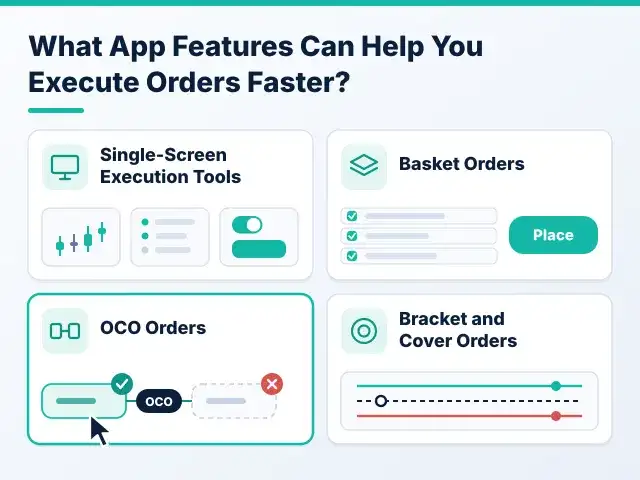
Server latency is only one part of order execution speed. The time you spend navigating the app and placing orders can also affect how quickly you complete a trade. Certain trading features can reduce these manual steps.
Single-Screen Execution Tools
Scalper tools allow traders to manage entries, exits, charts, and open positions from a single screen. Instead of switching between multiple sections, traders can access important information and execute orders through one interface. This can reduce the time spent navigating the application.
Basket Orders
Basket orders allow traders to place multiple orders together. They can be particularly useful when executing multi-leg options strategies that involve several positions.
OCO Orders
One-Cancels-the-Other (OCO) orders connect two orders. When one order gets executed, the other is automatically cancelled. This reduces the need to manually cancel the remaining order.
Bracket and Cover Orders
These order types support predefined trade management by combining entry and exit-related instructions, reducing the number of separate manual actions required. These features do not necessarily reduce the broker's server latency. However, they can improve the overall speed of the trading process by reducing manual steps.
FAQs
1. What is a good order execution speed for a trading app?
There is no single speed figure that can be compared across all brokers. You should first understand whether the broker reports internal processing, order-to-exchange latency, or full round-trip execution time.
2. What is P95 latency in trading?
P95 latency represents the execution time within which 95% of orders are completed. It helps traders understand execution consistency rather than relying only on average speed.
3. Why is order execution speed important for active traders?
Fast order execution can help active traders place orders with less delay. This becomes particularly relevant during volatile markets, when prices may change quickly between placing an order and its execution.
4. Do WebSockets improve trading app performance?
WebSockets support persistent, real-time communication between systems. They can help reduce communication overhead compared with repeated request-and-response connections, depending on the platform's implementation.
5. Do Scalper tools improve order execution speed?
Scalper tools can reduce the time spent navigating between charts, positions, and order placement screens. They improve interface efficiency, although they do not automatically reduce server-side execution latency.
Conclusion
Finding the trading best app for fast order execution requires evaluating more than the broker's advertised speed. You should understand the latency measurement, check P95 and P99 performance, examine stability during volatile sessions, and verify the technology supporting the platform. Features such as Scalper tools, Basket Orders, OCO, and Bracket Orders can also reduce manual execution steps.
Ultimately, choose a trading app that offers transparent performance data, reliable infrastructure, and practical order management features. A combination of execution consistency and interface efficiency can help create a smoother trading experience. Explore the trading services and investment solutions offered by Swastika Investmart to understand the tools available for your trading requirements.